Goal Setting Feature
Redesigning a broken goal-setting feature for fast live tutoring sessions.
- Company
 PLUS
PLUS
About
PLUS Personalized Learning is a hybrid human-AI tutoring platform with 900+ tutors, used across 25+ schools, supporting 8,900+ middle school students through real-time, in-class math tutoring sessions. Goal setting is a live cycle the tutor has to run quickly. The current goal was buried, the three scenarios were easy to mix up, and screen sharing meant students saw tutor-only guidance.
The work had two phases. Phase 1 helped tutors see the goal and where they were in the cycle. Phase 2 hid tutor-only guidance and rewrote the language for students during screen share.
900+
tutors served
8,900+
students supported
Context
During Fall 2025, PLUS launched the Goal Setting feature with promising adoption and clear usability gaps.
Since launch, PLUS collected early signals across usage data, session recordings, and qualitative observations. Those signals showed promising adoption and clear usability gaps.
The Current System
Understanding the tutor and their existing workflow established the constraints the redesign needed to work within.

Primary User
Tutor
Tutors operate the PLUS app and guide students through the Goal Setting activity.
Responsibilities
- Operates the PLUS app
- Works with ~6 students per session
- Guides the Goal Setting activity
- Enters the student’s goal
- Shares their screen with the student during Goal Setting
Session Structure
Goal setting begins directly after the warm up.
↓
Goal Setting Scenarios
↓
↓
Begin

Tutor

Student
The goal setting scenario depends on where the student is in their cycle.
Students move through three scenarios over time. The tutor enters and manages the goal in the app, while the student owns the goal.
During Goal Setting, the tutor shares their screen with the student, so the student sees the experience as the tutor moves through it.
Design Goals
The guiding design goals.
01
Make the cycle visible.
The live app does not show the three scenario cycle, so tutors have no way to see where they are.
02
Work for two audiences on one screen.
The tutor shares the screen with the student. Every interaction has to make sense to both at once.
03
Keep it fast enough for a live session.
With about six students, it has to be quick to start and effortless to run.
How might we make the goal setting self-evident, fast, and serve two audiences?
Design Decisions
The work happened in two iterations.
Iteration one was about high impact, low effort wins by focusing on making the cycle visible and keeping it fast enough for a live session.
Decision #1
Surface the goal as a goal statement.
Problem #1
The goal was buried in metadata, so tutors and students could not see it quickly during a live session.
Decision #2
Separate goal progress and system suggestions, and move both higher.
Problem #2
Update Goal did not make it easy to review the student’s progress or the system’s suggestions before changing the goal.
Decision #3
Mark the system’s suggested value on the slider.
Problem #3
The suggested value was easy to miss while entering a number, so tutors had no clear target and students on the shared screen could not see where they were aiming.
Decision #4
Move the goal cycle timeline to the top, and add a days remaining tag.
Problem #4
The end date was buried in metadata, so tutors had to dig for it before they could tell the student when the goal was due.
Decision #5
Write copy that signals each goal setting scenario.
Problem #5
Copy was unclear and inconsistent across scenarios, so it was hard to tell what should happen next.
Decision #6
Increase the slider handle, and add a text input.
Problem #6
Session recordings showed the small slider handle made exact value selection slow during live sessions.
Iteration two focused on ensuring the system served two audiences while preserving the fast nature of the feature from iteration one.
The data split
I defined what data both audiences should see and what stays tutor-only. Information that might discourage students was hidden from them and only provided for tutors. Information that would help guide tutors is for tutors only.
Tutor Only
- Tutor Notes
- Goal Setting Tooltips
- Student Status
- System Suggestion
Both
- Goal Edit Screen
- Goal Cycle Statement
- Current Progress
- Goal Review
- Cycle End Date
- Last Update
- Check-In Status
- Number of Sessions Left
When the switch happens
For each scenario, I defined when the experience should support student safe mode and when it was meant for tutors only.
Set Goal
- Starts to set goal
- Realizes student has no goal
- Starts goal setting with student (student safe)
- Inputs goal settings (student safe)
- Saves goal settings (student safe)
- Reviews final goal (student safe)
- Exits goal setting
Check Goal
- Starts goal activity
- Reviews student’s current progress
- Starts goal check in (student safe)
- Reviews goal with student (student safe)
- Saves goal check-in (student safe)
- Exits goal check-in
Update Goal
- Starts to set goal
- Reviews student’s previous goal stats
- Starts goal setting (student safe)
- Reviews previous goal with student (student safe)
- Inputs new goal settings (student safe)
- Saves new goal settings (student safe)
- Reviews final goal (student safe)
- Exits goal setting
Solution
The tutor stays in control. The view changes for the student.
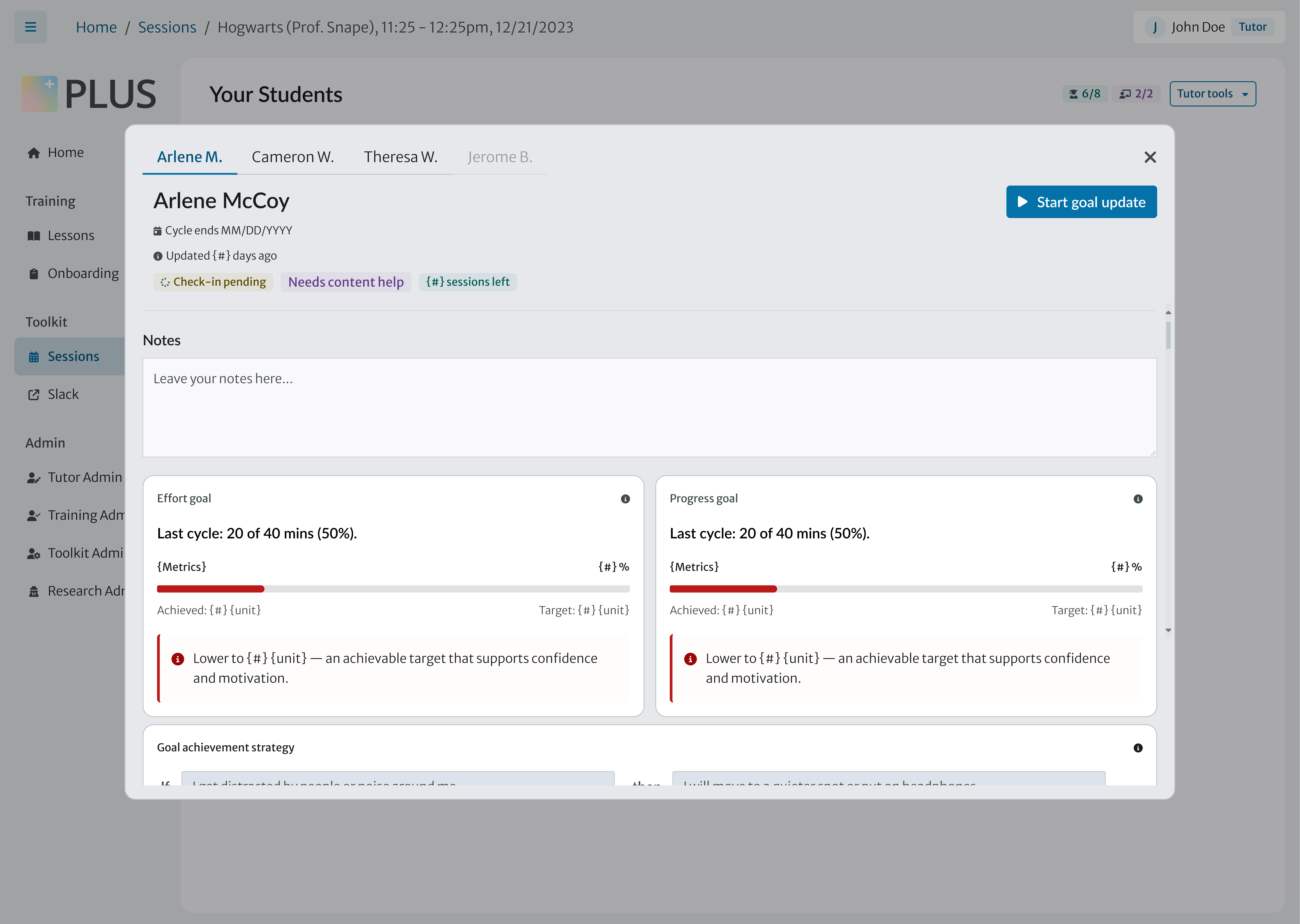
I designed two views of the same goal-setting experience. Tutor View contains the full information needed to facilitate the activity. When the tutor shares their screen, Student View hides tutor-only information and adapts the content for the student watching.
01
Set Goals
Start of a new goal cycle with no prior goals.
Scroll to continue
Impact
900+
8,900+
Learnings
Knowing when to hold back
I introduced a dropdown in the Check In scenario to give tutors more flexibility, but ultimately decided not to include it in the final design. The idea had value, but the timing and complexity it introduced did not make sense for the experience yet. Knowing when not to ship something is part of the design process.
Designing across a system
Set Goal, Check In, and Review + Update were connected parts of the same cycle, but each had different needs. Designing across all three taught me to balance consistency across the system with the flexibility each scenario needed.